
Tiny 4B model builds 3D assets for Godot and exports them as GLB
Developer CCORE has released an early preview of Qwen3.5-4B-GLB-3D-Coder. From a short sentence, the small model writes a Three.js scene that you can export as a GLB file and import into Godot. It runs locally, but it's still a work in progress.
What this is about
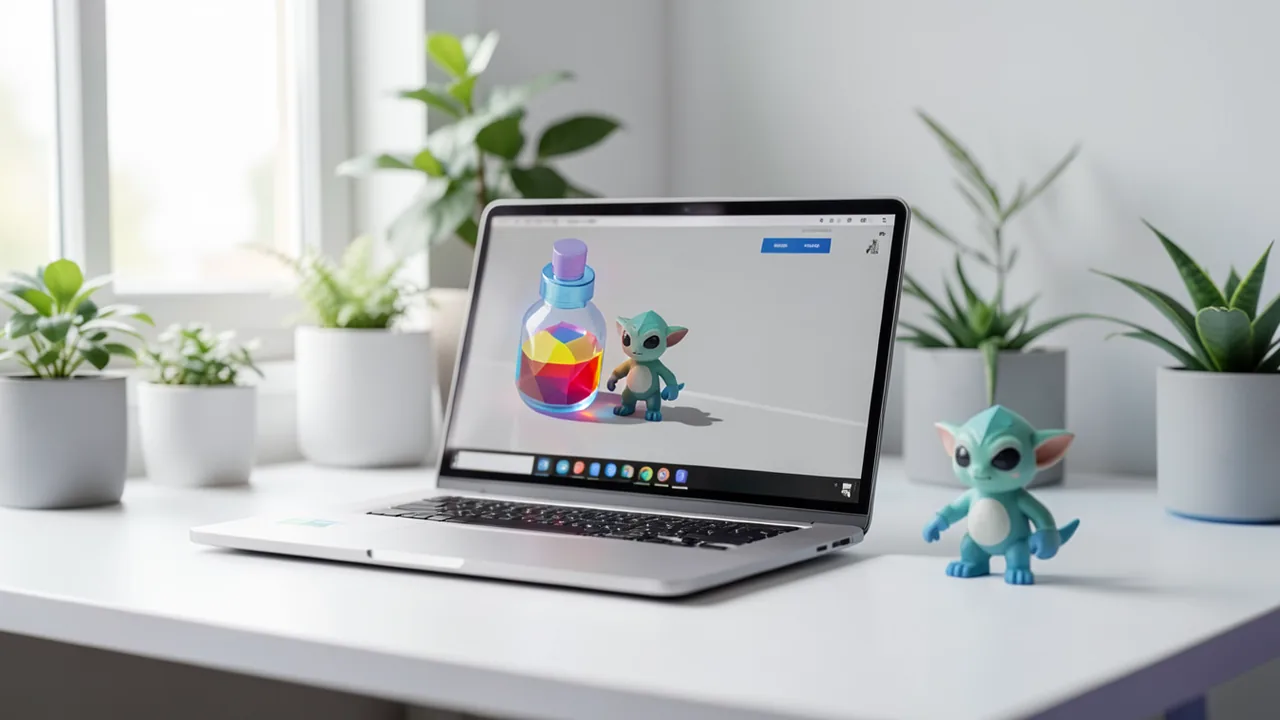
Developer CCORE has released an early preview checkpoint called Qwen3.5-4B-GLB-3D-Coder on Hugging Face and introduced it on r/LocalLLaMA. It's a small coding model with 4 billion parameters, built on Qwen3.5-4B. It is explicitly not an official Qwen release. The model writes code for Three.js scenes (a JavaScript library for 3D graphics in the browser) and includes a GLB export function. GLB is a compact binary format for 3D models that game editors like Godot can import directly.
CCORE is following up on his earlier 3D coding model. After its release, many people asked whether you could use it to generate assets for your own games. So he trained a version aimed squarely at that.
How it works
You give the model a system prompt (the base instruction that comes before your actual request), then a short request as the user message. The model replies with a complete, standalone HTML file. Open it in your browser and you see the asset. An "Export GLB" button lets you download a working GLB file. If the object needs an animation, the model is supposed to build it in and include it in the GLB file; otherwise the asset stays static. You then import the GLB file into Godot or another editor.
The system prompt from the Model Card says, roughly: generate game assets for the Godot editor, which uses GLB files; build the requested item as a high-quality low-poly asset using only Three.js in a single HTML file; the page must display the asset and include an export button; add animations where needed and export them too.
Examples and settings
According to CCORE, prompts don't need to be complicated. Short English requests have worked well, such as "Create a mana potion.", "Build a goblin." or "Build a weathered frontier medic station." For more control, you can be more detailed, for example: "Create a low-poly desert merchant in a self-contained Three.js HTML scene, with a button to export the character as a GLB file for use in Godot." On the Model Card and in the Reddit video, the developer shows screenshots of assets in the browser and after import into Godot.
The sampling settings currently in use (they control how random the model's word choices are) are:
| Parameter | Value |
|---|---|
| Temperature | 0.8 |
| Top K | 40 |
| Top P | 0.95 |
| Min P | 0.0 |
CCORE calls them a starting point and invites people to try other combinations.
Status and limits
This is the first working checkpoint. According to the developer, training is still running and should finish on the evening after the post (UTC), depending on progress. He then plans to release the full Safetensors weights and the training dataset, as he did with the predecessor model. Known limitations: some generations need another attempt or a small code fix, English prompts work better than other languages, and behavior may change with later checkpoints. All quality claims come from the developer himself; there are no independent tests or benchmarks.
What you need to try it
At 4 billion parameters, the model is small. The Q4_K_M file should take up roughly 3 to 4 GB, and Q8_0 about twice that (our own estimate; the source gives no file sizes). A graphics card with 4 to 6 GB of VRAM (video memory) is probably enough for Q4. Running on the CPU with 8 GB of RAM is also conceivable, though slower. The Model Card lists llama.cpp, Ollama, LM Studio, Jan, vLLM and other tools. For Ollama, ollama run hf.co/ccore/Qwen3.5-4B-GLB-3D-Coder:Q4_K_M is all you need. You open the generated HTML in a regular browser, and you need Godot for the import.
More context: Godot and 3D assets
The other sources show how else you can get assets into Godot. According to vr.org, Blendkit (formerly BlenderKit) released a Godot plugin in late July that gives you access to around 22,000 free models plus materials and HDRIs. The plugin is alpha, according to vr.org, doesn't run on macOS, and many .blend files import incorrectly; a GLTF option bypasses Blender. That suggests GLB/GLTF is the more robust route into Godot. Jude Janitha's Godot Pixel Renderer (MIT-licensed, according to Digital Production) converts animated GLB/GLTF files into pixel-art sequences, so it could be a follow-up step for assets made with this model. These sources don't draw any direct connection to CCORE's model.
Our take
The idea is practical: instead of generating meshes directly, a small language model writes code that assembles the object from simple shapes. That suits low-poly styles, prototypes and placeholders. Don't expect photorealistic or highly detailed results, though, and animations are probably basic. On the critical side: this is a work in progress, there are no benchmarks, the reliability claims are self-reported, and the license and Safetensors weights are still missing. Even so, it's a cheap experiment for hobbyist Godot developers, since it runs locally and for free.
Sources
- Reddit: lokale Modelle & Bild-KI huggingface.co
- vr.org vr.org
- digitalproduction.com digitalproduction.com
Try it yourself: Qwen3.5-4B-GLB-3D-Coder
Explained step by step, no prior knowledge needed – on your own computer or free in your browser.
What can I do with it?
From a short description, the model writes a complete HTML file containing a Three.js scene. You see your object in it, such as a mana potion, a goblin or a medic station, and can download it as a GLB file with a button. You can import that file into Godot and other editors. The result is low-poly, so think prototype and placeholder quality rather than finished game art. According to the developer, most attempts work right away, while some need a retry or a small code fix. English prompts work best. This is an early checkpoint that may still change. With only 4 billion parameters, it runs on average hardware, but it doesn't replace large models or modeling software.
Who is it worth it for?
Interesting for hobbyist game developers, game jam participants and tinkerers who need placeholder assets for Godot or other engines quickly. Less suitable if you expect detailed, production-ready models or reliable prompts in German.
Ideas: What you can do with it
Have it generate crates, potions or trees and import them into Godot to fill your level fast. That lets you test game ideas without doing your own modeling.
When time is short, you can produce a set of low-poly assets in minutes. If a result is broken, just regenerate it.
Read the generated code and see how objects are built from simple shapes and exported. It's a good entry point to 3D in the browser.
With prompts like "Build a goblin" you get simple figures that you can refine further in Blender or Godot.
Exported GLB files can be converted into retro sprites with tools like the Godot Pixel Renderer.
What your computer needs
Which variant is right for me?
Many models come in several sizes or "quantizations." These are compressed versions: smaller and faster, but slightly less accurate. Rule of thumb: pick the largest variant whose memory requirement fits in your VRAM (video memory). The scripts below choose this for you automatically.
| Variant | Download | Needs approx. | Compatible graphics cards |
|---|---|---|---|
Q4_K_M Default |
2.7 GB | 4 GB | almost any graphics card with 4 GB or more (e.g. GTX 1650, RTX 3050) |
Q8_0 |
4.5 GB | 6 GB | e.g. RTX 2060, RTX 3050 8 GB, RX 6600 |
Q4_K_M is the default choice for small graphics cards or ordinary laptops. Q8_0 is more accurate, needs about twice as much memory, and is worth it if you have a card with 8 GB or more and code quality matters more. The full Safetensors weights only arrive after training ends.
- Q4_K_M should run with about 4 GB of VRAM (estimate); Q8_0 needs roughly double.
- CPU-only operation is possible with 8 GB of RAM for 4B models, but slower.
- The generated HTML is displayed in a normal browser, so no powerful GPU is needed for that.
- Long responses (complete HTML files) need a sufficiently large context length, which costs additional memory.
How do I find out what my computer has?
- Windows: Press Ctrl + Shift + Esc → Task Manager → Performance tab → click GPU on the left. At the bottom you'll see Dedicated GPU memory (that's your VRAM). You'll find system memory under Memory.
- Mac: Apple menu at the top left → About This Mac. You'll see your chip (e.g. M2) and memory (e.g. 16 GB). On Apple chips, graphics and processor share this memory.
- Linux: Type
nvidia-smiin the terminal (shows your graphics card and its memory) andfree -hfor system memory.
Guide
Google Colab (in your browser, no installation)
Google Colab is a free service from Google. It gives you a computer with a graphics card in your browser for a few hours. All you need is a Google account. For this model: runs for free – The free Tesla T4 GPU with 15 GB is enough.
- Download the notebook. Click the button and save the file.
- Open Colab. Go to colab.research.google.com and sign in with your Google account.
- Upload the notebook. In the window that appears, click Upload on the left (or choose File → Upload notebook at the top) and select the file
colab.ipynb. - Turn on the GPU. In the top menu, go to Runtime → Change runtime type → under Hardware accelerator, select T4 GPU → Save.
- Start everything. Runtime → Run all (keyboard shortcut Ctrl + F9). If you see the warning “This notebook was not authored by Google,” click Run anyway.
- Wait. The cells run one after another. A green checkmark appears to the left of each cell when it's done. Installation and download take about 5 minutes here.
- Try it out. The result appears below the last cell. To test something else, change the text in the cell and run it again with Shift + Enter. The last cell starts a proper chat with an input field.
- Clean up. When you're done: Runtime → Disconnect and delete runtime. This saves your free quota.
Good to know: The free GPU is limited (usually a few hours per day). After about 90 minutes of inactivity, Colab disconnects, and you'll have to start everything over.
Windows 10 / 11
The easiest way is Ollama, a free program that launches AI models with a single command.
- Update your graphics driver (NVIDIA cards only): Install the NVIDIA app or the latest driver. For AMD cards, use the latest Adrenalin driver.
- Install Ollama. Download the file OllamaSetup.exe from ollama.com/download/windows, double-click it, and choose Install. Afterward, a small llama icon appears in the taskbar at the bottom right.
- Open a terminal window. Press the Windows key, type PowerShell and press Enter. A blue or black window opens.
- Start the model. Copy this command ("Copy" button), paste it into the window with a right-click, and press Enter:
The first time, Ollama downloads the model (2.7 GB (about 4 min at 100 Mbit/s)). After that, it's instant.ollama run hf.co/ccore/Qwen3.5-4B-GLB-3D-Coder:Q4_K_M - Start typing. Once
>>> Send a messageappears, type your question and press Enter. Type/byeto end the chat.
Not enough memory? Pick a smaller variant from the table above, e.g. ollama run hf.co/ccore/Qwen3.5-4B-GLB-3D-Coder:Q4_K_M.
Prefer automatic? A script that picks the right variant for you
- Download both files into the same folder: try_windows.ps1 demo.py
- Open the folder in File Explorer, right-click an empty spot and choose Open in Terminal.
- Paste this command and press Enter:
powershell -ExecutionPolicy Bypass -File try_windows.ps1
If needed, the script installs Ollama via winget, measures your VRAM (video memory) and downloads the matching variant.
macOS
Macs with an Apple chip (M1 to M5) are ideal. Older Intel Macs are very slow.
- Install Ollama. Download it from ollama.com/download/mac, open the file, and drag Ollama into your Applications folder. Launch Ollama once – a llama appears in the menu bar at the top.
- Open Terminal. Press Cmd + Space, type Terminal, and press Enter.
- Start the model. Paste the command (Cmd + V) and press Enter:
The first time, the model is downloaded (2.7 GB (about 4 min at 100 Mbit/s)).ollama run hf.co/ccore/Qwen3.5-4B-GLB-3D-Coder:Q4_K_M - Start typing. Type your question and press Enter. Quit with
/bye.
Linux
- Check your GPU.
nvidia-smishould show your card. If it doesn't, install the driver on Ubuntu and restart:sudo ubuntu-drivers install - Install Ollama:
curl -fsSL https://ollama.com/install.sh | sh - Start the model:
Exit withollama run hf.co/ccore/Qwen3.5-4B-GLB-3D-Coder:Q4_K_M/bye. Useollama psto check whether the model is running on the GPU. - Or let it pick the right variant automatically:
bash try_linux.sh
Try it
Create a mana potion.Build a goblin.Build a weathered frontier medic station.Create a low-poly desert merchant in a self-contained Three.js HTML scene, with a button to export the character as a GLB file for use in Godot.Create a low-poly treasure chest with an opening lid animation, exported in the GLB.Tips for better results
- Use the exact system prompt from the Model Card and send your request as the user message.
- Start with short English prompts and only get more detailed when needed.
- Begin with temperature 0.8, Top-K 40, Top-P 0.95, Min-P 0, then experiment.
- If the code is broken, regenerate or ask the model to fix the error.
If something goes wrong
The system prompt must be set, otherwise you won't reliably get an HTML file with an export button.
Non-English prompts work worse; write in English.
Some outputs contain errors and need a new attempt or a small fix.
This is a preview checkpoint: the Safetensors weights are still missing, and behavior may change.
Save the response as an .html file and open it in your browser to use the export button.
“out of memory,” a crash, or your computer freezes
The model is too big for your VRAM (video memory). Pick a smaller variant from the table above and close other programs, especially games and browsers with lots of tabs.
It runs, but extremely slowly
Your CPU is probably doing the work instead of your graphics card. In Ollama, the PROCESSOR column of ollama ps shows how much runs on the GPU. If it says "100% CPU", update your graphics driver or pick a smaller variant that fits entirely into VRAM (video memory).
“ollama” or “python” is not found
Close the terminal window and open it again so it recognizes the newly installed program. For Python on Windows: reinstall it and check Add python.exe to PATH.
Windows: "Running scripts is disabled on this system"
Run the script with exactly the command above: powershell -ExecutionPolicy Bypass -File try_windows.ps1. This allows execution for this one time only.
Error message when loading the model (version, "trust_remote_code", unknown architecture)
Brand-new models often need the latest software version. With Ollama: update Ollama. With Python: pip install -U transformers in the activated environment. The Model Card usually lists the exact version.
Tokenstrom generates the scripts and notebook automatically. Please take a quick look before running them – they're plain, readable text. Mind the model's license: apache-2.0.
Ask the AI assistant
Questions about this article, installation or background? Our assistant knows this page and runs on our own machine, not in someone else's cloud.
The Assistant is an AI (Gemma 4) and can make mistakes – please check important details against the source. Questions are used only to generate an answer and are deleted after one hour. Please don't enter any personal data.

Comments
What do you think? Already tried it? Write it here, no sign-up needed.
Comments are public. Links aren't allowed, and we delete abusive posts. You can delete your own comment at any time in this browser. Learn more in the Privacy Policy.