
ChatGPT now makes GIFs: Images 2.6 animates text prompts and photos
OpenAI is rolling out a new ChatGPT feature with Images 2.6: a text prompt or an uploaded photo becomes an animated GIF in one step. You can then adjust the speed and edit individual frames. Developers get two new image models in the API.
What's new
OpenAI is bringing animated GIFs to ChatGPT. With the new Images 2.6 image model, the chatbot can now turn a written request or an uploaded photo straight into a short, looping animation in GIF format. The Verge broke the news on November 4, 2026, and Unite.AI, XDA Developers and CryptoBriefing followed.
OpenAI says the feature is rolling out to all ChatGPT and Codex users on the web and in the desktop and mobile apps. Codex is OpenAI's coding assistant. The sources don't mention any restriction to specific paid plans, but rollouts like this can take a few days to reach everyone.
What the GIF feature can do
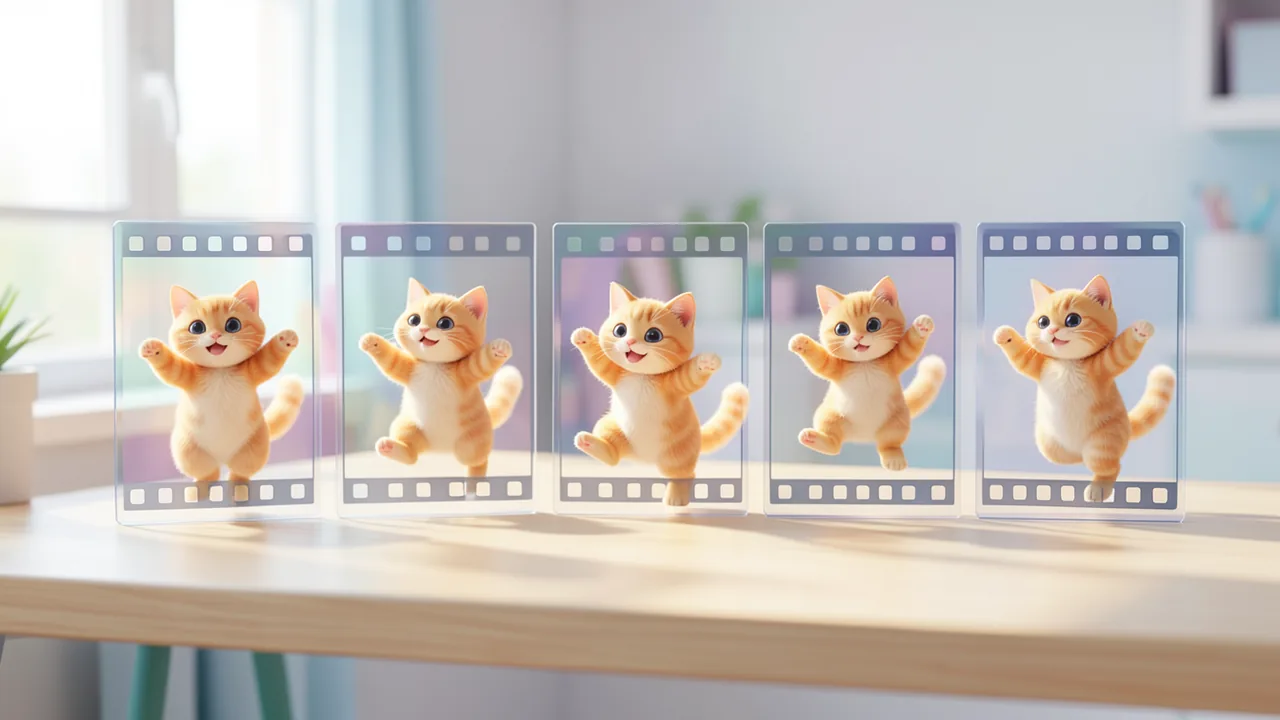
The workflow is deliberately simple. You describe what you want to see or upload an image, and ChatGPT animates it. OpenAI demonstrates this with a fitting example. Asked
"Can you make a GIF of a dancing cat?"
ChatGPT delivers the animation and immediately offers more options.
Once the GIF is done, you can:
- change the playback speed, making the animation run faster or slower,
- view the individual frames, the single images that make up the animation,
- edit specific frames,
- share the finished GIF.
CryptoBriefing points out that frame-level editing is more useful than it first sounds. If one frame goes wrong, you don't have to regenerate the whole animation. You can fix just the botched paw, for example, and keep the rest of the dance. Until now, ChatGPT had no direct way to make GIFs. If you wanted an animation, you had to generate several still images and stitch them together in another program.
Images 2.6 is also supposed to generate images faster in general. According to the sources, OpenAI hasn't shared specific numbers.
Under the hood: 9 frames, a fifth of a second each
CryptoBriefing spotted traces of the feature in OpenAI's code before the official launch. On November 3, 2026, OpenAI merged a pull request (a code change) into the public Codex repository that enables GIF output via the Images API. It reveals these specs:
| Feature | Value |
|---|---|
| Number of frames | 2 to 16 |
| Default | 9 frames |
| Display time per frame | 200 milliseconds |
| Length of a default GIF | approx. 1.8 seconds per loop |
So a default GIF consists of nine frames, each shown for a fifth of a second. That's enough for a quick gesture or a simple movement, but not for a short film.
According to CryptoBriefing, the code also supports edits via a spritesheet: a single image with all frames laid out side by side in a grid. Video games have used this technique for animations for decades. A still preview also stays visible while the animation is being generated.
For developers, the GIF feature in the API is currently hidden behind a feature flag, a switch that keeps it turned off for now. It isn't publicly documented yet either, so third-party apps can't rely on it for the time being.
Two new API models: Flare and Sunburst
OpenAI is offering developers two models:
- GPT-Image-2.6 Flare is built for fast generation,
- GPT-Image-2.6 Sunburst is built for higher image quality.
This split already existed with version 2.5. Back then, OpenAI positioned Flare as the default for most use cases, such as quick prototypes and high-volume image generation. Sunburst was meant for demanding work like ad campaigns or premium product shots; it took longer but offered more control when editing. The sources don't mention pricing for the 2.6 models.
CryptoBriefing writes that GPT Image 2.6 is also expected to bring 4K resolution and markup-based editing, where you draw directly on the image to show what should change. The available sources don't officially confirm this, though.
How we got here: from DALL·E to Images 2.5
The GPT Image series replaced DALL·E as OpenAI's image generator. Heise traces the history: in 2025, the multimodal 4o model introduced a new image generation system that replaced DALL·E. Images 2.0 followed in April 2026 with a "Thinking" mode and web search. Images 2.5 arrived on September 8, 2026, around the same time as GPT-6.
According to OpenAI, Images 2.5 brought finer detail, better lighting and better textures. People and objects from reference images were reproduced more faithfully, and results stayed more consistent across multiple edits. Wait times dropped by up to 50 percent compared with Images 2.0. New tools came along too:
- Sketch: You draw a rough sketch as a template. As Heise notes, Stable Diffusion has offered this since 2023.
- Templates: Presets for posters, flyers or product photos, for example. ChatGPT asks for text, style and layout via a form.
- In-image comments for targeted changes.
- Prompt sharing, so others can build on your idea with their own photos.
Heise also notes that OpenAI's images have carried digital C2PA and SynthID watermarks since 2024. These are invisible markers that identify AI-generated images. Since August 2026, providers in the EU have been required to label photorealistic AI content. The sources don't say whether the watermarks are also embedded in the new GIFs.
Usage numbers
According to OpenAI, ChatGPT and the API now produce more than 4 billion images per week, up from over 3 billion when Images 2.5 launched in September. Unite.AI notes that this figure lumps together all image activity and says nothing about how often the new GIF feature gets used. According to Heise, business customers of OpenAI's image models include Adobe, Canva and Higgsfield.
Our take
Technically, this isn't a big leap, but it's genuinely handy in everyday use. GIFs remain one of the most popular formats for reactions, memes and social media. Social media teams, marketers and meme makers can skip the detour through external tools. And frame-level editing goes beyond the simple "reroll" most image generators offer.
The limits are tight, though. With 16 frames at most, you're stuck with short, simple loops. For real clips, you'll still need video generators like OpenAI's Sora or its competitors. It's also unclear how smooth and coherent the animations look in practice. There are no independent tests yet, and the cat demo comes from OpenAI itself. Developers will have to wait: the groundwork is in the code, but until the feature flag is lifted and documentation arrives, you can't reliably use GIF output via the API.
Sources
- Unite.AI unite.ai
- Bing News (en-US) cryptobriefing.com
- xda-developers.com xda-developers.com
- heise.de heise.de
- The Decoder (EN) the-decoder.com
- The Decoder (DE) the-decoder.de
- Bing News (en-US) thenextweb.com
Ask the AI assistant
Questions about this article, installation or background? Our assistant knows this page and runs on our own machine, not in someone else's cloud.
The Assistant is an AI (Gemma 4) and can make mistakes – please check important details against the source. Questions are used only to generate an answer and are deleted after one hour. Please don't enter any personal data.
Comments
What do you think? Already tried it? Write it here, no sign-up needed.
Comments are public. Links aren't allowed, and we delete abusive posts. You can delete your own comment at any time in this browser. Learn more in the Privacy Policy.