
Nvidia open-sources MotionBricks, an AI that animates game characters and robots
Nvidia has released the code and models for MotionBricks for free. The AI generates movement for game characters and the Unitree G1 humanoid robot in real time, so animators don't have to build transitions by hand. It's not a finished product yet, and so far the impressive numbers come only from the developers themselves.
What's going on
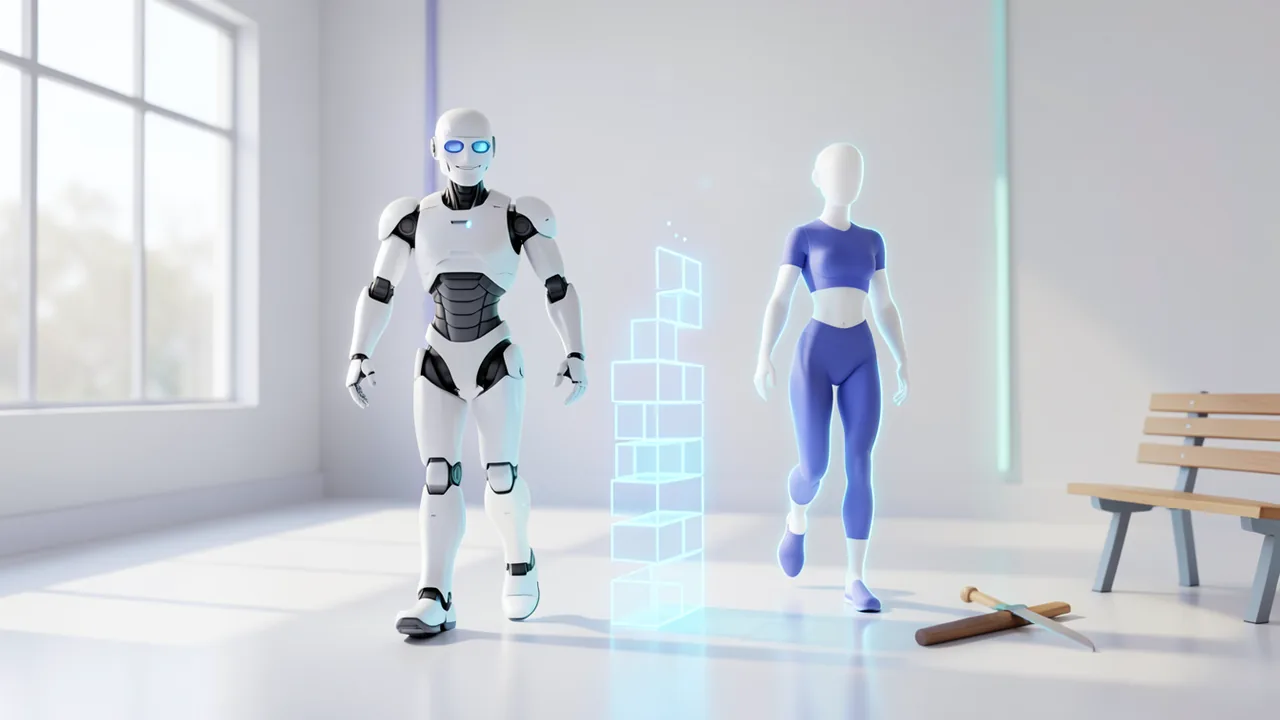
Nvidia has released MotionBricks, a package of code and pretrained models. The AI generates in real time how a game character or the Unitree G1 humanoid robot moves. All it needs is a handful of target poses, such as "character sits on the bench" or "character holds the sword". The model works out how to get there on its own. In today's games, animators build exactly these transitions by hand, and it's tedious work. According to the official project page, a single model covers more than 350,000 motions. Nvidia says it runs at 15,000 frames per second with 2 milliseconds of latency.
It was built by Nvidia Research's GEAR lab together with researchers from ETH Zurich, Simon Fraser University and the University of Texas at Austin. The paper lists 16 authors, led by Tingwu Wang and Olivier Dionne. It was published in the journal ACM Transactions on Graphics and presented in July at the SIGGRAPH 2026 graphics conference. The preprint has been on arXiv since April 27. Everything is free and open, but this is research, not a finished product.
The problem: animation is expensive
A game character needs to walk, run, crouch, vault over obstacles and sit down. To make that happen, studios today record hundreds of clips with motion capture, meaning actors in special suits whose movements are captured digitally. They then wire those clips together in a state machine. Think of it as a giant wiring diagram that defines which animation is allowed to follow which. Every new behavior makes the diagram bigger and more expensive.
The paper uses Assassin's Creed to show how big these systems get. Its animation graph can contain more than 15,000 animations and 5,000 states, nested up to 12 levels deep. Today the industry often relies on motion matching. The game searches a database for the best-fitting pre-recorded motion snippet. Unreal Engine 5 ships with the technique, along with a free sample library from Epic containing more than 500 animations. MotionBricks doesn't search. It generates new motion, including transitions nobody ever recorded.
How MotionBricks generates motion
The core technique is called in-betweening: the model fills the gap between key poses, much like animators used to draw the in-between frames of a cartoon. Thirty times a second, it gets two inputs. The first is context, meaning the character's last four poses with posture and velocity. The second is one to four target poses the motion should reach. If you give it several targets, the system also picks up on speed and momentum. The character then runs through a point instead of slowing down at it.
The model decides for itself how long a transition takes. Each pass generates 0.6 to 1.9 seconds of motion. It works in three steps:
- One module predicts the duration and the path of the pelvis.
- A transformer fills in the actual movement along that path. That's the same network architecture that powers language models.
- A VQ-VAE decoder turns it into smooth animation with feet planted cleanly on the ground. A VQ-VAE stores motion as a kind of construction kit made of fixed building blocks.
Longer sequences come from chaining several passes together. If the player changes direction, the model replans.
Training used BONES-SEED, a dataset of 350,000 motion capture clips of real actors. Bones Studio recorded it and published it on Hugging Face. On top of that, Nvidia built what it calls Smart Primitives, reusable motion building blocks. For locomotion, commands for speed, direction and style become target poses. That lets the character switch between a zombie walk, a limp, strafing and a crouched run without any retraining. For objects, a few key poses are enough:
"The model fills in the approach, the contact and the follow-through," the project page says.
Examples include grabbing a sword, vaulting over a bench or sitting down. According to the paper, someone with no animation training can build one of these blocks in Unreal Engine 5 in under ten minutes.
The numbers and the fine print
The official demo shows 2 minutes and 40 seconds of continuous footage in Unreal Engine 5. The character moves through the environment and interacts with it. Nvidia writes:
"Every motion is generated by neural networks: no foot locking, no blending, no collision detection, no handcrafted transitions."
The results in the paper were measured on around 35,000 clips against six competing methods. The site i-scoop compiled them:
| Test | MotionBricks | Comparison |
|---|---|---|
| Reaches target pose (within 5 cm and 15°) | 99.6% | 87.7% for the best competitor, at most 78.2% for diffusion models |
| Preferred by 40 animation and robotics experts | 86.5% of comparisons | each against two methods |
| LaFAN1-G1 robot benchmark | 61.1% | target pose hit rate |
| Speed | 15,000 FPS, 2 ms | measured on RTX 5090 |
| Model size | approx. 200M parameters | checkpoints public |
All of these figures come from the authors themselves. Nobody has independently verified them yet. The 99.6 percent also refers to a proprietary Bones Studio dataset with about 700 hours of recordings, 9,300 skills and 163 actors. On the public datasets HumanML3D and LaFAN1, the lead shrinks. On motion diversity, some methods match it or even come out ahead. In the robot test, the hit rate drops to 61.1 percent. And the 15,000 frames per second were measured on an RTX 5090, the most powerful card in the lineup. Nvidia tested the released demos on an RTX 4090. According to i-scoop, no commercial game uses the technology yet.
The same model moves a robot
Nvidia also trained a version for the Unitree G1 humanoid robot. To do that, the motion data was retargeted to the robot's skeleton. Input works the same way as for the game character, again through target poses. On the Jetson Orin, the G1's onboard computer, one pass takes 5 milliseconds. The model replans ten times a second or whenever a new command comes in. According to the project page, MotionBricks is already a core part of GR00T Whole-Body Control, Nvidia's software for controlling humanoid robots. There it works alongside GEAR-SONIC.
There is a limit, though: the model outputs desired poses, not motor commands. A separate controller that tracks the poses keeps the robot from falling over. The Model Cards explicitly warn that the generated motion is "not validated for physical robot control". Here, MotionBricks is a motion planner.
Download, licenses and what's missing
Everything is available for free in the GitHub repository NVlabs/motionbricks. It contains:
- a Python runtime (with Warp, Newton and TensorRT)
- pretrained models for the SOMA human skeleton and for the G1 in ONNX format, an interchange format for AI models that many programs can read
- checkpoints on Hugging Face
- two demos (Inbetweener and Scene Preview)
- two editors, one for building motion blocks and one for assembling scenes
According to i-scoop, the Unreal plugin from the demo, the full training pipeline and the complete training data are missing. There's no official integration for Unity or Godot. Thanks to the ONNX format, a studio can build one itself, but it'll have to do the work on its own.
The licensing comes in three tiers:
- The code is under Apache 2.0, and commercial use is allowed.
- The trained models are under the NVIDIA Open Model Agreement. It permits commercial use, but the license terminates if you sue Nvidia claiming the model infringes a patent or copyright.
- The sample motions are under an evaluation-only license. They can't ship in a released game.
What you need to try it
You need an Nvidia GPU. Other vendors and Apple Macs aren't supported. Nvidia only documents tests on Windows and Linux with an RTX 4090. It doesn't say how well it runs on cheaper RTX cards. At around 200 million parameters, the model is small and should, on paper, need little VRAM (video memory). That isn't guaranteed, though. You should also be comfortable with Python. There's no one-click app like you get with chatbots.
Our take
MotionBricks tackles a real and expensive problem in game development. Instead of giant wiring diagrams built from thousands of clips, you need one model and a few target poses. That's especially interesting for small studios without their own animation team. The fact that the same model also moves a robot shows how tightly Nvidia ties gaming and robotics together.
In practice, hurdles remain. The headline numbers rest on proprietary data and haven't been independently checked. On public datasets and on the robot, the lead shrinks noticeably. The game engine plugin is missing. And the model can only do what's in its training data. That shifts the bottleneck: if you want to use it in a game, you need licensed motion data to train or fine-tune it. So the first game to ship with MotionBricks is still some way off.
Sources
- Bing News (pt-BR) tekimobile.com
- marktechpost.com marktechpost.com
- developer.nvidia.com developer.nvidia.com
Try it yourself: MotionBricks
Explained step by step, no prior knowledge needed – on your own computer or free in your browser.
What can I do with it?
MotionBricks generates motion for a human 3D skeleton (SOMA) or for the Unitree G1 robot. You give it one to four target poses, and the model computes a smooth, natural motion to get there in real time, with feet that stay planted cleanly on the ground. Using commands for speed, direction and style, the character can switch between walking, limping, a zombie walk or a crouched run, for example. Interactions such as sitting down, vaulting over a bench or grabbing a sword can be defined as building blocks with a few key poses. At around 200 million parameters the model is small, and Nvidia says it's extremely fast. But it can only do what's in its training data, and on public datasets its lead over other methods is much smaller than on Nvidia's own. It's not a chatbot: you don't type text, you work with poses, demos and editors. The output is explicitly not validated for real robot motors.
Who is it worth it for?
It's worth it for game developers, technical artists, robotics hobbyists and students who know Python and have a powerful Nvidia card. If you just want to play with AI, have a Mac or an AMD card, or have no programming experience, you won't get much out of it, because there's no ready-made app and no Unreal plugin.
Ideas: What you can do with it
Use MotionBricks to quickly give a test character running, crouching and jumping without wiring up hundreds of clips. That way you see early on whether the controls feel good before you invest in real animation.
In the scene editor, roughly lay out characters, benches and objects and let the motion be generated automatically. You get a quick 3D storyboard to discuss camera work and blocking.
With the primitive editor, you create blocks like "open door" or "climb onto crate" from a few poses. Nvidia says even someone without animation training can do it in under ten minutes.
With the G1 model, you plan motions for the humanoid robot in simulation and combine them with your own controller. It's a good entry point into Nvidia's GR00T Whole-Body Control robot stack.
Students can use the demos to see how in-betweening works with a transformer and a VQ-VAE. The open code is a good fit for courses on animation and robotics.
What your computer needs
There are two pretrained models in ONNX format: one for the SOMA human skeleton (for game characters and animation) and one for the Unitree G1 robot. For games and animation, use the SOMA model. Only use the G1 model if you're working with the robot or its simulation. There are no quantized variants. Only an RTX 4090 has been officially tested.
- An Nvidia GPU is required, because the runtime uses Warp, Newton and TensorRT. AMD, Intel graphics and Apple Silicon aren't supported.
- Nvidia only documents tests on Windows and Linux with an RTX 4090.
- The 15,000 frames per second and 2 ms latency were measured on an RTX 5090. There are no figures for weaker RTX cards.
- The model has only around 200 million parameters and should therefore need little VRAM. This hasn't been officially confirmed.
- On the Jetson Orin in the Unitree G1, Nvidia says one pass takes 5 milliseconds.
- CPU-only operation isn't supported.
How do I find out what my computer has?
- Windows: Press Ctrl + Shift + Esc → Task Manager → Performance tab → click GPU on the left. At the bottom you'll see Dedicated GPU memory (that's your VRAM). You'll find system memory under Memory.
- Mac: Apple menu at the top left → About This Mac. You'll see your chip (e.g. M2) and memory (e.g. 16 GB). On Apple chips, graphics and processor share this memory.
- Linux: Type
nvidia-smiin the terminal (shows your graphics card and its memory) andfree -hfor system memory.
Guide
This model runs with its developers' own program (NVlabs/motionbricks on GitHub). The commands below come from the Model Card and the developers' instructions.
Windows 10 / 11
Windows 10 / 11: supported. NVIDIA has officially tested Windows with an RTX 4090. You need an NVIDIA GPU, because the program uses TensorRT (NVIDIA's inference acceleration software).
- Install the prerequisites. You need an NVIDIA GPU with a current driver. Install Git, Git LFS (a Git extension for large files) and uv (a fast Python package manager that also brings its own Python). You'll find the installers on each project's official website. To check that everything is in place, run the commands below in PowerShell: each one should print a version number.
nvidia-smi git --version git lfs version uv --version - Set up Git LFS. This command enables Git LFS once for your user account. Without LFS, the model files will be missing later.
git lfs install - Download the program. This downloads the MotionBricks software from GitHub and switches into its folder. The ready-made ONNX models (a common interchange format for AI models) are already included, so you don't need the weights from Hugging Face.
git clone https://github.com/NVlabs/motionbricks cd motionbricks - Fetch the large files. This command pulls down the large files, such as models and motion samples. Depending on your connection, it can take a few minutes.
git lfs pull - Create the environment and install. uv creates its own Python environment (the .venv folder) and installs all packages, including Warp, Newton and TensorRT. You don't need to activate the environment, because "uv run" takes care of that later. If no red error messages show up, it worked.
uv sync - Run your first test. This command launches the Inbetweener demo. On first launch, TensorRT builds an engine plan for your GPU, which takes a few minutes. The plan is saved in the .trt-cache folder, so every launch after that is fast. A window then opens: pick poses from clips, place them and let the motion in between be generated.
uv run python -m app.inbetweener_demo - Result. A window with the Inbetweener opens. There you set poses, and MotionBricks generates the motion connecting them in real time.
macOS
macOS: not supported. The program uses TensorRT and, according to NVIDIA, strictly requires an NVIDIA GPU. Macs don't have one. Use a Windows or Linux PC with an NVIDIA card instead, or watch the videos on the project page.
Linux
Linux: supported. NVIDIA has officially tested Linux (x86-64) with an RTX 4090. You need an NVIDIA GPU with a matching driver, because the program uses TensorRT.
- Install the prerequisites. You need an NVIDIA GPU with the NVIDIA driver installed. Also install Git, Git LFS (a Git extension for large files) and uv (a Python package manager that brings its own Python). You can usually get Git and Git LFS from your distribution's package manager, and uv from its official website. Check everything in the terminal with the commands below: each should show a version or information about your GPU.
nvidia-smi git --version git lfs version uv --version - Set up Git LFS. This command enables Git LFS once for your user account. Without LFS, the model files will be missing later.
git lfs install - Download the program. This downloads the MotionBricks software and switches into its folder. The ready-made ONNX models (a common interchange format for AI models) are already included. You don't need to download anything from Hugging Face for the demos.
git clone https://github.com/NVlabs/motionbricks cd motionbricks - Fetch the large files. This command pulls down the large files, such as models and motion samples. It can take a few minutes.
git lfs pull - Create the environment and install. uv creates its own Python environment in the .venv folder and installs all packages, including Warp, Newton and TensorRT. You don't need to activate anything, because "uv run" handles that automatically later.
uv sync - Run your first test. This command launches the Inbetweener demo. On first launch, TensorRT spends a few minutes building an engine plan for your GPU and saves it in .trt-cache. A window then opens: pick poses from clips, place them and let the motion in between be generated.
uv run python -m app.inbetweener_demo - Result. A window with the Inbetweener opens. There you set poses, and MotionBricks generates the motion connecting them in real time.
What to do after your first result
- In Scene Preview, you steer a character through an obstacle course. It runs, vaults over obstacles, crouches and sits down. Launch it with: uv run python -m app.scene_preview --scene assets/scenes/soma_gym.scene.json (for the robot: g1_gym.scene.json).
- Dedicated editors let you build your own blocks and scenes: uv run python -m app.smart_primitive_editor and uv run python -m app.scene_editor. You'll find a step-by-step introduction in the Guided Tutorial at docs/guided_tutorial.md.
- Want to export ONNX models yourself? Download the weights with hf download nvidia/MotionBricks --local-dir checkpoints/MotionBricks. Then export them with uv run --locked --project tools/onnx motionbricks-onnx --model soma --checkpoints checkpoints/MotionBricks/soma. Add --precision fp16 to get smaller models in mixed FP16 precision.
- Important: MotionBricks only generates motion and is not a controller for real robots. For real hardware, you also need your own controller and a safety review.
Try it
Launch the Inbetweener demo and set a standing start pose and a crouched target pose. Watch how the model times the transition on its own.In the demo, set two target poses in a row, for example running left and then running forward. Check whether the character runs through the first point without slowing down.Switch the locomotion style from normal walking to limping or a zombie walk without retraining anything.In the primitive editor, build your own "sit on a chair" block from three key poses: approach, contact, seated.In the scene editor, put together a small scene with a bench and a sword and let the character navigate through it in Scene Preview.Tips for better results
- Give it several target poses instead of just one. The model then picks up speed and momentum, and the motion looks smoother.
- Let the model set the duration of transitions itself. One pass generates 0.6 to 1.9 seconds of motion, and longer sequences come from chaining passes together.
- Describe object interactions with a few clear key poses for approach, contact and follow-through. The model fills in the rest.
- Don't expect motions that aren't in the training data. Test anything unusual in the demo first before you build on it.
If something goes wrong
The software won't run without an Nvidia GPU. Check beforehand that you have current drivers and matching versions of CUDA and TensorRT installed.
The Unreal Engine plugin from the official demo isn't included. For Unreal, Unity or Godot, you'll have to integrate the ONNX models yourself.
The sample motions are under an evaluation-only license and can't be used in released games.
The models are under the NVIDIA Open Model Agreement. The license terminates if you sue Nvidia for patent or copyright infringement by the model.
The full training pipeline and complete training data are missing, so retraining on your own is only partly possible.
For real robots: the generated poses aren't validated for physical control. You need your own controller that tracks the poses.
“out of memory,” a crash, or your computer freezes
The model is too big for your VRAM (video memory). Pick a smaller variant from the table above and close other programs, especially games and browsers with lots of tabs.
It runs, but extremely slowly
Your CPU is probably doing the work instead of your graphics card. In Ollama, the PROCESSOR column of ollama ps shows how much runs on the GPU. If it says "100% CPU", update your graphics driver or pick a smaller variant that fits entirely into VRAM (video memory).
“ollama” or “python” is not found
Close the terminal window and open it again so it recognizes the newly installed program. For Python on Windows: reinstall it and check Add python.exe to PATH.
Windows: "Running scripts is disabled on this system"
Run the script with exactly the command above: powershell -ExecutionPolicy Bypass -File try_windows.ps1. This allows execution for this one time only.
Error message when loading the model (version, "trust_remote_code", unknown architecture)
Brand-new models often need the latest software version. With Ollama: update Ollama. With Python: pip install -U transformers in the activated environment. The Model Card usually lists the exact version.
Tokenstrom generates the scripts and notebook automatically. Please take a quick look before running them – they're plain, readable text. Mind the model's license: Code: Apache 2.0; Modelle: NVIDIA Open Model Agreement.
Ask the AI assistant
Questions about this article, installation or background? Our assistant knows this page and runs on our own machine, not in someone else's cloud.
The Assistant is an AI (Gemma 4) and can make mistakes – please check important details against the source. Questions are used only to generate an answer and are deleted after one hour. Please don't enter any personal data.
Comments
What do you think? Already tried it? Write it here, no sign-up needed.
Comments are public. Links aren't allowed, and we delete abusive posts. You can delete your own comment at any time in this browser. Learn more in the Privacy Policy.